Getting started#
Note: For instrument specific guides, please see the IRDB
A basic simulation would look something like this:
from matplotlib import pyplot as plt

from scopesim import example_simulation
from scopesim.source.source_templates import star_field

source = star_field(
    n=100,
    mmax=15,    # [mag]
    mmin=20,
    width=200,  # [arcsec]
)

simulation = example_simulation()
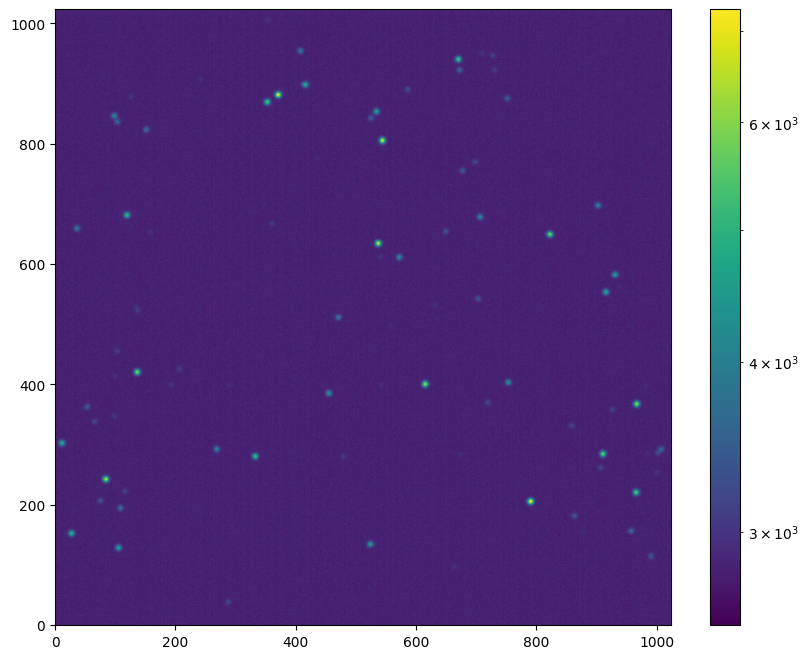
hdulist = simulation(source, dit=60, ndit=10)  # dit and ndit in seconds

plt.figure(figsize=(10, 8))
plt.imshow(hdulist[1].data, origin="lower", norm="log")
plt.colorbar()
astar.scopesim.detector.detector_manager - Extracting from 1 detectors...
<matplotlib.colorbar.Colorbar at 0x7f85a6f04a50>
Code breakdown#
Let’s break this down a bit.
There are three major components of any simulation workflow:
the target description,
the telescope/instrument model, and
the observation.
For the target description we are using the ScopeSim internal template functions from scopesim.source.source_templates, however many more dedicated science related templates are available in the external python package ScopeSim-Templates
Here we create a field of 100 A0V stars with Vega magnitudes between V=15 and V=20 within a box of 200 arcsec:
source = star_field(
    n=100,
    mmax=15,    # [mag]
    mmin=20,
    width=200,  # [arcsec]
)
Next we load the sample optical train object from ScopeSim.
Normally we will want to use an actual instrument. Dedicated documentation for real telescope+instrument systems can be found in the documentation sections of the individual instruments in the Instrument Reference Database (IRDB) documentation
For real instruments loading the optical system generally follows a different pattern:
from scopesim import Simulation
simulation = Simulation("instrument_name", mode="instrument_mode")
or, for instruments with combination modes (e.g. MICADO):
simulation = Simulation("instrument_name", mode=["mode_1", "mode_2"])
Once we have loaded the instrument, we can set the observation parameters by accessing the internal settings dictionary:
simulation = example_simulation(mode="imaging")
simulation.settings["!OBS.dit"] = 60   # [s]
simulation.settings["!OBS.ndit"] = 10
Finally we observe the target source and readout the detectors, which can be done by simly calling the simulation instance.
What is returned (hdulist) is an astropy.fits.HDUList object which can be saved to disk in the standard way, or manipulated in a python session.
simulation(source)
astar.scopesim.detector.detector_manager - Extracting from 1 detectors...
[<astropy.io.fits.hdu.image.PrimaryHDU object at 0x7f85a65043d0>, <astropy.io.fits.hdu.image.ImageHDU object at 0x7f85a63296d0>]
Tips and tricks#
Focal plane images#
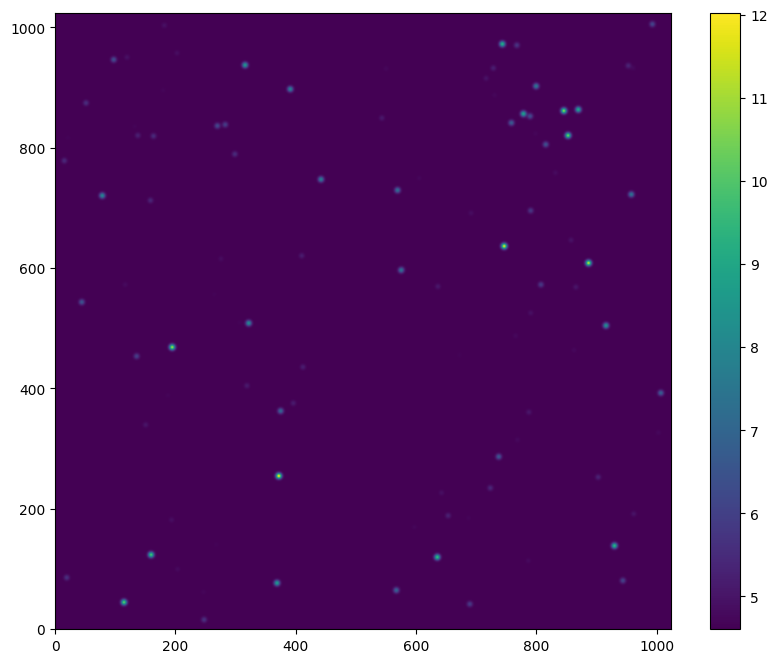
Intermediate frames of the focal plane image without the noise proerties can be accessed by looking inside the optical train object and accessing the first image plane:
noiseless_image = simulation.optical_train.image_planes[0].data
plt.figure(figsize=(10, 8))
plt.imshow(noiseless_image, origin="lower")
plt.colorbar()
<matplotlib.colorbar.Colorbar at 0x7f85a6332510>
Turning optical effects on or off#
All effects modelled by the optical train can be listed with the .effects attribute:
simulation.optical_train.effects
| element | name | class | included |
|---|---|---|---|
| str16 | str22 | str29 | bool |
| basic_atmosphere | atmospheric_radiometry | AtmosphericTERCurve | True |
| basic_telescope | psf | SeeingPSF | True |
| basic_telescope | telescope_reflection | TERCurve | True |
| basic_instrument | static_surfaces | SurfaceList | True |
| basic_instrument | filter_wheel : [J] | FilterWheel | True |
| basic_instrument | slit_wheel : [narrow] | SlitWheel | False |
| basic_instrument | image_slicer | ApertureList | False |
| basic_detector | detector_window | DetectorWindow | True |
| basic_detector | detector_3d | DetectorList3D | False |
| basic_detector | qe_curve | QuantumEfficiencyCurve | True |
| basic_detector | exposure_integration | ExposureIntegration | True |
| basic_detector | dark_current | DarkCurrent | True |
| basic_detector | shot_noise | ShotNoise | True |
| basic_detector | detector_linearity | LinearityCurve | True |
| basic_detector | readout_noise | PoorMansHxRGReadoutNoise | True |
| basic_detector | source_fits_keywords | SourceDescriptionFitsKeywords | True |
| basic_detector | effects_fits_keywords | EffectsMetaKeywords | True |
| basic_detector | config_fits_keywords | SimulationConfigFitsKeywords | True |
| basic_detector | extra_fits_keywords | ExtraFitsKeywords | True |
These can be turned on or off by using their name and the .include attribute:
simulation.optical_train["detector_linearity"].include = False
Listing available modes and filters#
The list of observing modes can be found by using the .modes attribute of the commands objects:
simulation.settings.modes
imaging: Basic NIR imager, status=development
spectroscopy: Basic three-trace long-slit spectrograph, status=development
ifu: Basic three-trace integral-field-unit spectrograph, status=development
simple_ifu: For testing the virtual 3D Detector with direct cube output, status=development
mock_concept_mode: Dummy mode to test concept status., status=concept
mock_experimental_mode: Dummy mode to test experimental status., status=experimental
mock_deprecated_mode: Dummy mode to test deprecated status without message., status=deprecated
mock_deprecated_mode_msg: Dummy mode to test deprecated status with message., status=deprecated
The names of included filters can be found in the filter effect. Use the name of the filter object from the table above to list these:
simulation.optical_train["filter_wheel"].filters
{'BrGamma': FilterCurve: "BrGamma",
 'CH4': FilterCurve: "CH4",
 'J': FilterCurve: "J",
 'H': FilterCurve: "H",
 'Ks': FilterCurve: "Ks",
 'open': FilterCurve: "open"}
Setting observation sequence#
Although this could be different for some instruments, most instruments use the exptime = ndit * dit format.
nditand dit are generally accessible in the top level !OBS dictionary of the command object in the optical train.
simulation.settings["!OBS.dit"] = 60   # [s]
simulation.settings["!OBS.ndit"] = 10
Listing and changing simulation parameters#
The command dictionary inside the optical system contains all the necessary paramters.
simulation.settings
CurrObs
❗OBS
- exptime: None
- dit: 60
- ndit: 10
CurrSys
❗OBS
- instrument: basic_instrument
- psf_fwhm: 1.5
- modes: ['imaging']
- dit: 60
- ndit: 10
- slit_name: narrow
- wavelen: 2.1
- include_slit: False
- include_slicer: False
- include_det_window: True
- include_det_3d: False
- filter_name: J
❗ATMO
- background:
- filter_name: J
- value: 16.6
- unit: mag
❗TEL
- telescope: Basic Telescope
- temperature: 0
- area: 0.19634954084936207 m2
- etendue: 0.007853981633974483 arcsec2 m2
❗INST
- temperature: -190
- pixel_scale: 0.2
- plate_scale: 20
❗DET
- image_plane_id: 0
- temperature: -230
- dit: !OBS.dit
- ndit: !OBS.ndit
- width: 1024
- height: 1024
- x: 0
- y: 0
SystemDict
❗SIM
- spectral:
- wave_min: 0.3
- wave_mid: 2.2
- wave_max: 20
- wave_unit: um
- spectral_bin_width: 0.0001
- spectral_resolution: 5000
- minimum_throughput: 1e-06
- minimum_pixel_flux: 1
- sub_pixel:
- flag: False
- fraction: 1
- random:
- seed: None
- computing:
- chunk_size: 2048
- max_segment_size: 16777217
- oversampling: 1
- spline_order: 1
- flux_accuracy: 0.001
- preload_field_of_views: False
- nan_fill_value: 0.0
- file:
- example_data:
- suburl: example_data
- hash_file: example_data_registry.txt
- psfs:
- suburl: psfs
- hash_file: psfs_registry.txt
- atmo:
- suburl: atmo
- hash_file: atmo_registry.txt
- local_packages_path: /home/docs/checkouts/readthedocs.org/user_builds/scopesim/checkouts/stable/scopesim/tests/mocks
- server_base_url: https://scopesim.univie.ac.at/InstPkgSvr/
- retries: 3
- use_cached_downloads: False
- search_path: ['./inst_pkgs/', './']
- error_on_missing_file: False
- example_data:
- reports:
- ip_tracking: False
- verbose: False
- rst_path: ./reports/rst/
- latex_path: ./reports/latex/
- image_path: ./reports/images/
- image_format: png
- preamble_file: None
- tests:
- run_integration_tests: True
- run_skycalc_ter_tests: True
❗OBS
❗TEL
- etendue: 0
- area: 0
❗INST
- pixel_scale: 0
- plate_scale: 0
- decouple_detector_from_sky_headers: False
The command object is a series of nested dictionaries that can be accessed using the !-string format:
simulation.settings["!<alias>.<param>"]
simulation.settings["!<alias>.<sub_dict>.<param>"]
For example, setting the atmospheric background level is achieved thusly:
simulation.settings["!ATMO.background.filter_name"] = "K"
simulation.settings["!ATMO.background.value"] = 13.6
The updated parameters (and the previous defaults) can be viewed by querying the "!ATMO" section. Values in higher levels always override defaults in lower levels.
simulation.settings["!ATMO"]
[0] mapping
- background:
- filter_name: K
- value: 13.6
[1] mapping
- background:
- filter_name: J
- value: 16.6
- unit: mag
Inspecting the system transmission#
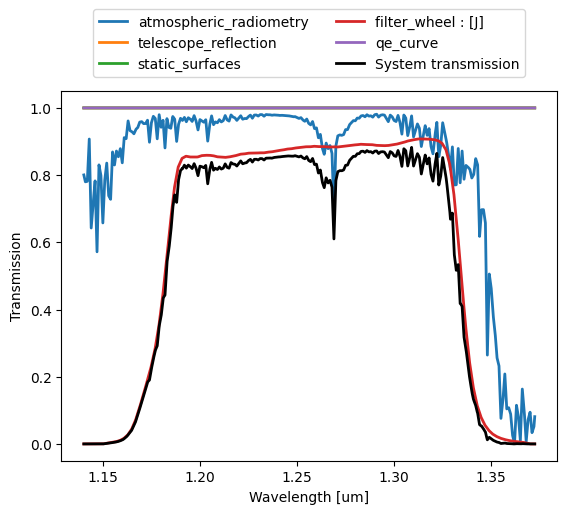
The total system transmission and the contribution from the individual elements in the optical train can be visualised as follows:
simulation.optical_train.optics_manager.system_transmission(plot=True);
More information#
For more information on how to use ScopeSim be see:
Contact#
For bugs, please add an issue to the github repo
For enquiries on implementing your own instrument package, please drop us a line at astar.astro@univie.ac.at or kieran.leschinski@univie.ac.at